" height="17.999923152223392px" id="wVZNRk5v1" transform="translate(9.718 0)" width="17.669902775649575px"/><g d="M 0 0 C 4.879 0 8.835 4.029 8.835 9 C 8.835 13.971 4.879 18 0 18 Z" fill="transparent" height="17.999923152223392px" id="oZuFlkdb5" transform="translate(6.184 0)" width="8.834951474139757px"><path d="M 0 0 C 4.879 0 8.835 4.029 8.835 9 C 8.835 13.971 4.879 18 0 18 Z" fill="rgb(218, 64, 98)" height="17.999923152223392px" id="IiikZgo85" transform="translate(0 0)" width="8.834951480323639px"/></g><path d="M 2.683 0 L 2.747 0.064 C 4.436 1.783 5.379 4.119 5.367 6.552 C 5.355 8.984 4.389 11.31 2.683 13.012 C 0.964 11.3 -0.003 8.954 0 6.505 C 0 3.958 1.028 1.654 2.683 0 Z" fill="rgb(30, 0, 93)" height="13.012144446742262px" id="CBHDfgp4h" transform="translate(10.16 2.7)" width="5.36727425024361px"/><g d="M 0 0 C 1.277 0 2.54 0.233 3.72 0.685 C 4.882 1.127 5.951 1.789 6.872 2.636 C 7.761 3.454 8.478 4.447 8.979 5.556 C 9.465 6.637 9.717 7.811 9.718 9 C 9.717 10.189 9.465 11.363 8.979 12.444 C 8.478 13.553 7.761 14.546 6.872 15.364 C 5.951 16.211 4.882 16.874 3.72 17.316 C 2.53 17.77 1.27 18.001 0 18 Z" fill="transparent" height="17.999930534464635px" id="jhkgUcs2L" width="9.718446526607295px"><path d="M 0 0 C 1.277 0 2.54 0.233 3.72 0.685 C 4.882 1.127 5.951 1.789 6.872 2.636 C 7.761 3.454 8.478 4.447 8.979 5.556 C 9.465 6.637 9.717 7.811 9.718 9 C 9.717 10.189 9.465 11.363 8.979 12.444 C 8.478 13.553 7.761 14.546 6.872 15.364 C 5.951 16.211 4.882 16.874 3.72 17.316 C 2.53 17.77 1.27 18.001 0 18 Z" fill="rgba(218, 64, 98, 0.5)" height="17.999930534464635px" id="g9AELDm9v" width="9.718446526607295px"/></g><path d="M 53.702 18 C 52.492 18 51.434 17.745 50.526 17.235 C 49.632 16.738 48.901 15.984 48.425 15.066 C 47.948 14.129 47.709 13.027 47.709 11.762 C 47.709 10.496 47.963 9.386 48.473 8.432 C 48.977 7.484 49.74 6.705 50.669 6.189 C 51.608 5.663 52.692 5.4 53.917 5.4 C 54.554 5.4 55.19 5.49 55.827 5.671 C 56.443 5.835 57.03 6.093 57.57 6.436 C 58.064 6.748 58.311 7.208 58.311 7.816 C 58.311 8.244 58.215 8.597 58.024 8.877 C 57.851 9.13 57.564 9.278 57.26 9.271 C 57.057 9.271 56.855 9.238 56.663 9.172 C 56.488 9.091 56.249 8.976 55.946 8.827 C 55.654 8.666 55.351 8.526 55.039 8.408 C 54.756 8.304 54.456 8.254 54.156 8.26 C 53.264 8.26 52.58 8.556 52.102 9.148 C 51.64 9.724 51.41 10.57 51.41 11.687 C 51.41 12.805 51.64 13.66 52.102 14.252 C 52.58 14.844 53.264 15.14 54.156 15.14 C 54.49 15.14 54.785 15.098 55.039 15.016 C 55.294 14.917 55.605 14.77 55.97 14.573 C 56.204 14.455 56.443 14.348 56.687 14.252 C 56.862 14.17 57.053 14.129 57.26 14.129 C 57.562 14.129 57.809 14.269 58.001 14.548 C 58.207 14.827 58.311 15.181 58.311 15.608 C 58.311 16.216 58.064 16.668 57.57 16.964 C 57.023 17.31 56.427 17.568 55.803 17.729 C 55.118 17.912 54.411 18.003 53.702 18 Z M 35.782 18 C 34.456 18 33.293 17.745 32.29 17.235 C 31.287 16.709 30.514 15.978 29.971 15.041 C 29.427 14.088 29.155 12.97 29.155 11.687 C 29.155 10.406 29.427 9.296 29.971 8.359 C 30.514 7.405 31.287 6.673 32.29 6.164 C 33.293 5.655 34.456 5.4 35.782 5.4 C 37.107 5.4 38.27 5.655 39.273 6.165 C 40.276 6.674 41.049 7.405 41.592 8.359 C 42.136 9.295 42.408 10.406 42.408 11.687 C 42.408 12.97 42.136 14.088 41.592 15.041 C 41.049 15.978 40.276 16.709 39.273 17.236 C 38.27 17.745 37.107 18 35.782 18 Z M 35.782 15.165 C 37.65 15.165 38.585 14.006 38.585 11.687 C 38.585 10.52 38.338 9.65 37.845 9.074 C 37.37 8.498 36.682 8.211 35.782 8.211 C 33.913 8.211 32.978 9.37 32.978 11.687 C 32.978 14.006 33.913 15.164 35.782 15.164 Z M 22.099 18 C 21.584 18 21.155 17.849 20.812 17.547 C 20.485 17.246 20.32 16.802 20.32 16.215 L 20.32 1.785 C 20.32 1.198 20.484 0.754 20.812 0.453 C 21.155 0.151 21.584 0 22.099 0 C 22.598 0 23.012 0.151 23.339 0.453 C 23.683 0.754 23.854 1.198 23.854 1.785 L 23.854 16.215 C 23.854 16.802 23.683 17.246 23.339 17.547 C 23.012 17.849 22.598 18 22.099 18 Z M 7.08 18 C 5.776 18 4.563 17.851 3.44 17.552 C 2.318 17.237 1.403 16.797 0.693 16.232 C 0.445 16.05 0.264 15.859 0.148 15.66 C 0.049 15.444 0 15.178 0 14.863 C 0 14.448 0.124 14.083 0.371 13.767 C 0.636 13.452 0.933 13.295 1.263 13.295 C 1.445 13.295 1.617 13.328 1.782 13.394 C 1.964 13.444 2.179 13.543 2.427 13.693 C 3.097 14.123 3.821 14.458 4.58 14.689 C 5.306 14.888 6.107 14.988 6.981 14.988 C 8.071 14.988 8.904 14.805 9.482 14.44 C 10.059 14.075 10.347 13.552 10.347 12.872 C 10.347 12.357 10.076 11.942 9.531 11.626 C 9.003 11.311 8.054 11.012 6.685 10.731 C 5.149 10.416 3.919 10.033 2.996 9.585 C 2.088 9.137 1.419 8.581 0.99 7.917 C 0.578 7.253 0.372 6.448 0.372 5.502 C 0.372 4.457 0.669 3.519 1.263 2.689 C 1.873 1.842 2.707 1.186 3.763 0.722 C 4.835 0.24 6.04 0 7.377 0 C 9.721 0 11.652 0.589 13.17 1.768 C 13.418 1.966 13.592 2.174 13.691 2.39 C 13.805 2.588 13.864 2.839 13.864 3.137 C 13.864 3.551 13.731 3.917 13.467 4.233 C 13.22 4.548 12.931 4.705 12.601 4.705 C 12.425 4.706 12.25 4.681 12.081 4.63 C 11.932 4.581 11.719 4.473 11.438 4.306 C 10.761 3.875 10.134 3.552 9.556 3.336 C 8.995 3.12 8.277 3.012 7.402 3.012 C 6.395 3.012 5.603 3.211 5.025 3.61 C 4.448 3.991 4.159 4.522 4.159 5.203 C 4.159 5.602 4.266 5.934 4.481 6.199 C 4.712 6.448 5.084 6.673 5.594 6.871 C 6.124 7.07 6.867 7.278 7.823 7.493 C 10.067 7.992 11.677 8.631 12.651 9.41 C 13.64 10.191 14.136 11.262 14.136 12.622 C 14.136 13.684 13.839 14.622 13.244 15.436 C 12.667 16.249 11.841 16.879 10.769 17.328 C 9.713 17.776 8.483 18 7.08 18 Z" fill="rgb(30, 0, 93)" height="18px" id="cdcwirY_U" transform="translate(32.689 0)" width="58.31067427037016px"/></g></svg>)
Back
How to streamline your data gathering with RFI upload
Once your client has filled in the RFI template you downloaded from Sloc, you can upload it back into Sloc to update your market data.
This allows you to bring external inputs directly into your structured analysis without manual re-entry.
Note: You can only upload RFI templates generated from Sloc. Files created outside of Sloc are not currently supported.
When to use this
Use the upload feature when:
You have sent a Sloc RFI template to your client
The client has completed or updated the spreadsheet
You want to merge their inputs back into your project
How to upload an RFI
From the Prepare markets screen:
Click the upload icon in the top right
Select your completed RFI file
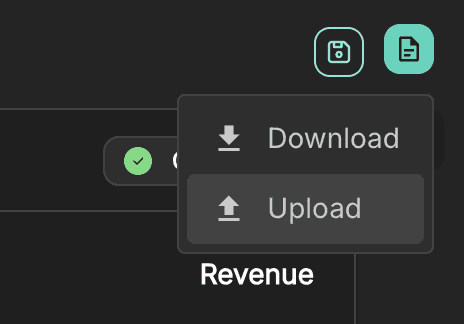
You can either:
Drag and drop the file
Or click Select file
Once selected, click Next to proceed.
Change review
Before applying any updates, Sloc will analyse the file and show you what has changed.
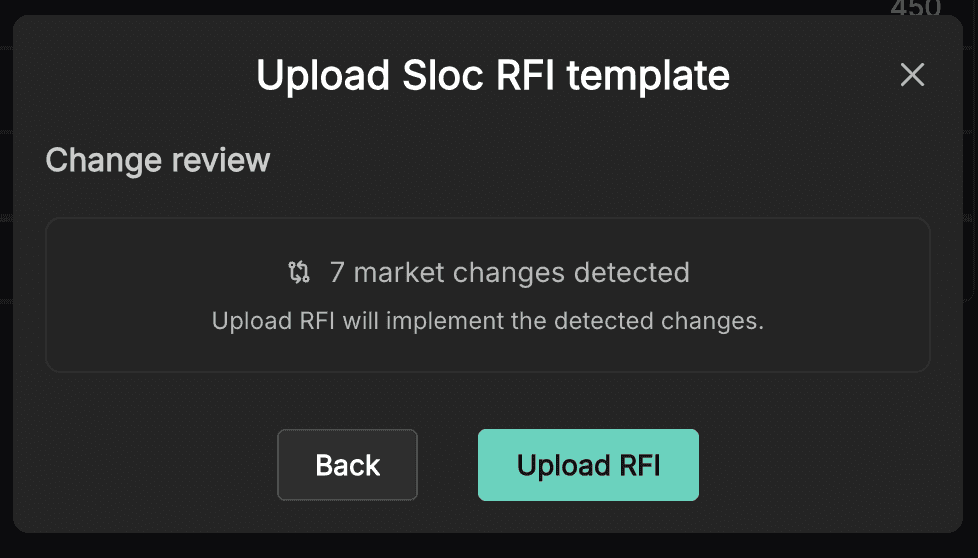
This includes: Number of market changes detected
If no changes are detected, you can still proceed, but no updates will be applied.
Uploading without restricted editing
If your original RFI was created without restricted editing:
The system will detect all changes made in the spreadsheet
You can directly upload and apply them
This is the simplest workflow, where all editable fields are treated equally.
Uploading with restricted editing
If your original RFI was created with restricted editing enabled, the workflow includes an additional step.
You will see:
Confirmation that a restricted template has been uploaded
Which companies are affected
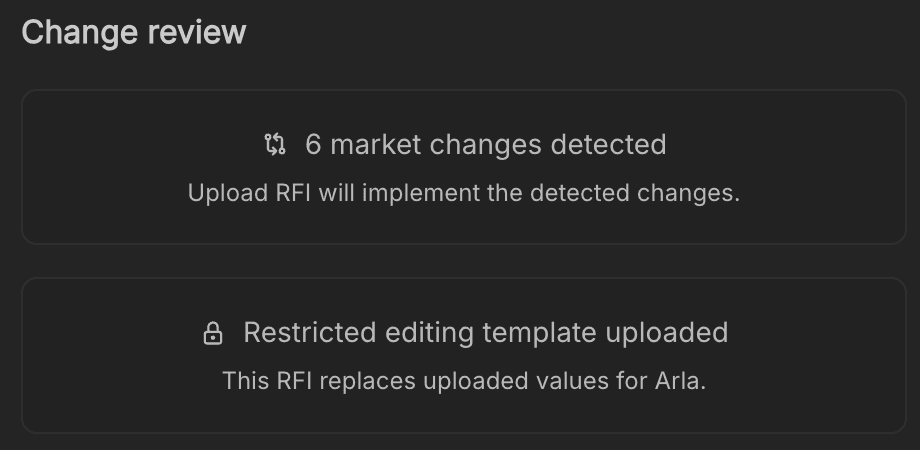
Because only specific companies were editable, you now need to decide how to merge the updates back into your dataset.
Merge options
You will be asked to choose how the uploaded data should be applied.
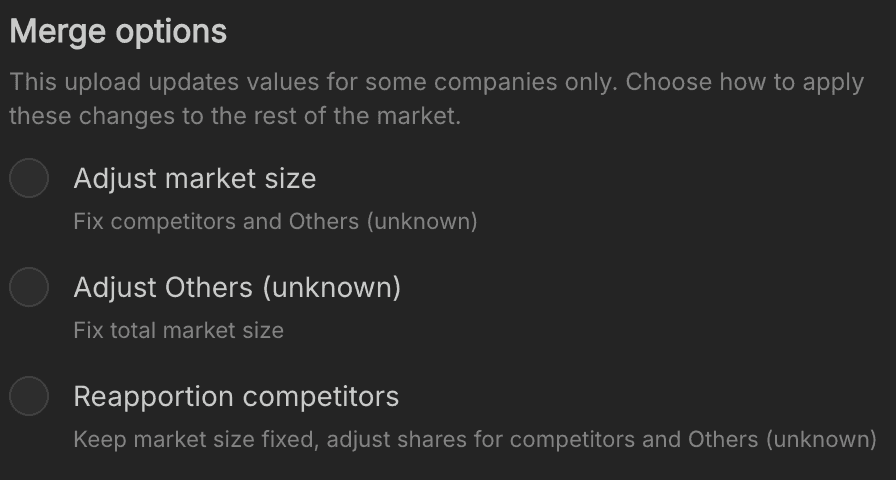
Adjust market size
Updates the overall market size based on uploaded values
Keeps competitor values and Others (unknown) fixed
Use this when the new data reflects a change in total market size.
Adjust Others (unknown)
Keeps the total market size fixed
Adjusts Others (unknown) to account for updated company values
Use this when you trust the total market size but want to refine known company shares.
Reapportion competitors
Keeps the total market size fixed
Redistributes shares across competitors and Others (unknown)
Use this when updates affect the overall distribution rather than absolute totals.
Applying the upload
Once you’ve selected your merge option:
Click Upload RFI
The system will apply the detected changes to your markets.
What to do next
After uploading:
Review each affected market in the workspace
Check for any discrepancies or unexpected changes
Reconfirm markets where necessary
Once everything is validated, you can proceed to analysis.